
Features
Visual Features
- Display Size - Show window size when resizing
- Display Position - Show window position when moving
- Minimize to Tray - Press Alt while minimizing
- Multi-screen Support - Drag maximized windows between screens
Window Control
- Resize Presets - Quick resize to predefined sizes
- Extend/Reduce Width - Adjust window width precisely
- Extend/Reduce Height - Adjust window height precisely
- Move Window - Move windows in any direction
- Shift Between Screens - Move to different monitors
User Friendly
- Simple Interface - Easy to configure
- Lightweight - Minimal system footprint
- Portable - No installation required
- Configurable Hotkeys - Customize your shortcuts
Default Hotkeys
Window Control
Win + Alt + Ctrl + ↓
Minimize to System Tray
Win + [
Enlarge Window
Win + ]
Shrink Window
Win + ↑
Extend Height
Win + ↓
Reduce Height
Win + ←
Extend Width (Left)
Win + →
Reduce Width (Right)
Move Window
Win + Ctrl + ↑
Move Up
Win + Ctrl + ↓
Move Down
Win + Ctrl + ←
Move Left
Win + Ctrl + →
Move Right
Shift Between Screens
Win + Alt + ↑
Shift to Upper Screen
Win + Alt + ↓
Shift to Bottom Screen
Win + Alt + ←
Shift to Left Screen
Win + Alt + →
Shift to Right Screen
Screenshots
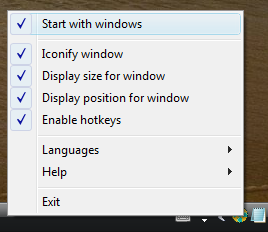
Main Menu

Size & Position Display
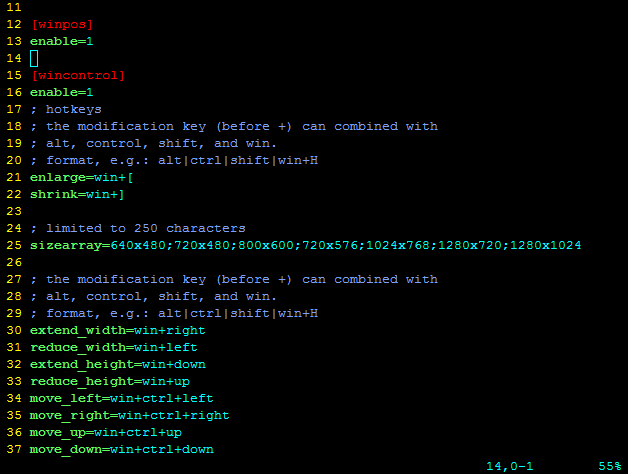
Settings Configuration
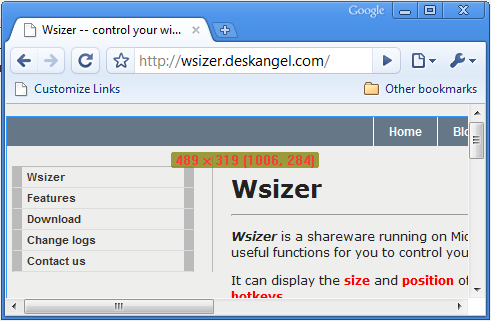
Window Effects
Download
Latest Version
Wsizer
Portable version - No installation required
Changelog
Latest Version
- Display window size and position while moving/resizing
- Minimize to system tray with Alt key
- Multi-screen support improvements
- Configurable keyboard shortcuts